How to deploy on push with a GitHub Actions webhook
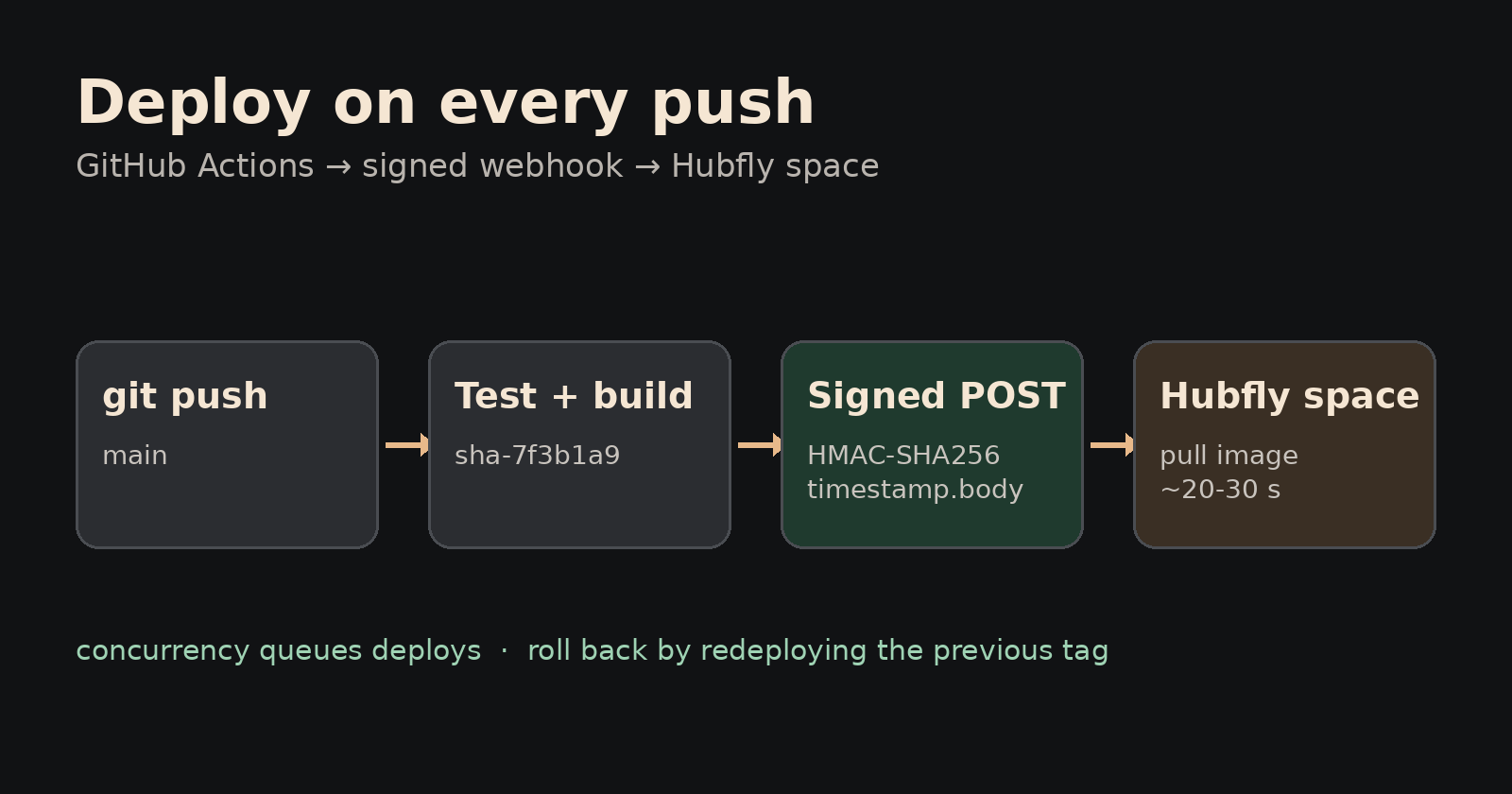
Deploy on push with GitHub Actions: every merge to main goes live on its own, but only after your tests pass. Clicking Redeploy by hand is slow, and it's how an untested build reaches users on a Friday evening. In this guide you'll connect GitHub Actions to Hubfly space with a signed deploy webhook, stop two deploys from colliding, and set up a rollback to any previous image tag.
Try it on Hubfly space: 360 free hours a month on the shared tier (a one-time $5 deposit, kept as credit, unlocks creating resources).
What a deploy webhook does
A deploy webhook is an address your CI calls when a build is ready; Hubfly space then performs one action on your container, such as pulling a new image. A registry push never redeploys anything by itself, so the webhook is the missing "now ship it" step.
Hubfly space offers three security modes:
| Mode | How the call is checked | Actions you can allow |
|---|---|---|
| Basic | Token inside the URL | Image Pull only |
| Standard | Token inside the URL | Image Pull, Provisioning, Hard Restart |
| HMAC-SHA256 | Signed timestamp + body, no token in the URL | All, including Config Update and Rollback Recovery |
Use HMAC-SHA256. With Basic or Standard, anyone who sees the URL in a leaked build log can deploy you. With HMAC-SHA256 the URL alone is useless: each request is signed, and signatures older than five minutes are refused, so a captured request stops working after that window.
Step 1: Create the webhook
Open your project, click the Pipeline tab, then Create webhook.
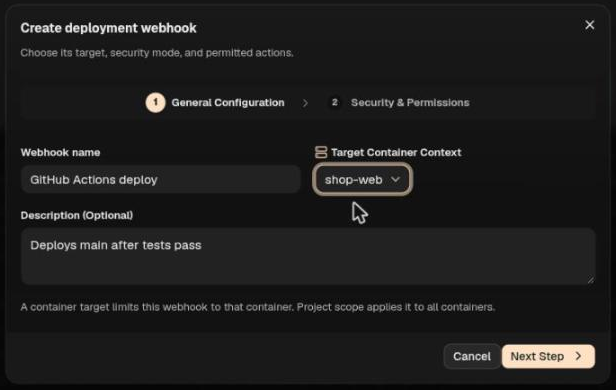
- Name it, for example
GitHub Actions deploy. - Under Target Container Context, pick the one container this pipeline deploys, such as
shop-web. Binding it to one container means a leaked secret can't touch anything else. - Click Next Step.
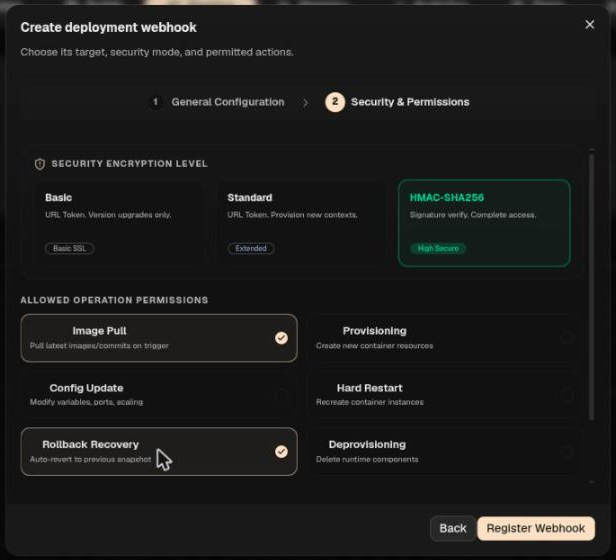
- Choose HMAC-SHA256.
- Under Allowed Operation Permissions, keep Image Pull on. Leave Deprovisioning off: a deploy pipeline never needs to delete anything.
- Optional: if your CI runs on a machine with a fixed public IP (a self-hosted runner or build server), add it under IP Allowlist Restriction.
- Click Register Webhook.
A dialog shows the HMAC Signing Secret Key and the Deployment Pipeline URL Target. Copy both now: the secret is shown once, and webhooks can't be edited later.
Step 2: Store the values in GitHub
In your repository, open Settings → Secrets and variables → Actions and add two repository secrets:
HUBFLY_WEBHOOK_URL: the URL (it looks likehttps://api.hubfly.space/api/webhooks/deploy/whk_…)HUBFLY_WEBHOOK_SECRET: the signing secret
GitHub masks secrets in logs, so the key is hidden in build output.
Step 3: Deploy on push with a GitHub Actions webhook
Save this as .github/workflows/deploy.yml. It runs on ubuntu-latest (OpenSSL 3, curl 7.76 or newer for --fail-with-body) and targets an image-based container. The build job pushes ghcr.io/your-org/shop-web:sha-<first 7 characters of the commit>; adapt it to your Dockerfile and registry, or keep your own build job and name it build. Hubfly space must be able to pull the image: GitHub makes new GHCR packages private, so either make the package public (Package settings → Change visibility) or set Registry Authentication when you create the container, with a token that can read it.
name: Deploy to Hubfly space
on:
  push:
    branches: [main]
  workflow_dispatch:
    inputs:
      tag:
        description: "Image tag to deploy (for a rollback, the previous sha- tag)"
        required: false

concurrency:
  group: hubfly-deploy-production
  cancel-in-progress: false

jobs:
  test:
    if: github.event_name == 'push'
    runs-on: ubuntu-latest
    steps:
      - uses: actions/checkout@v4
      - run: echo "run your tests here"

  build:
    needs: test
    runs-on: ubuntu-latest
    permissions:
      contents: read
      packages: write
    steps:
      - uses: actions/checkout@v4
      - id: vars
        run: echo "tag=sha-${GITHUB_SHA::7}" >> "$GITHUB_OUTPUT"
      - uses: docker/setup-buildx-action@v3
      - uses: docker/login-action@v3
        with:
          registry: ghcr.io
          username: ${{ github.actor }}
          password: ${{ secrets.GITHUB_TOKEN }}
      - uses: docker/build-push-action@v6
        with:
          push: true
          tags: ghcr.io/your-org/shop-web:${{ steps.vars.outputs.tag }}

  deploy:
    needs: [test, build]
    if: always() && ((needs.build.result == 'success') || github.event_name == 'workflow_dispatch')
    runs-on: ubuntu-latest
    steps:
      - name: Trigger Hubfly space deployment
        env:
          HUBFLY_WEBHOOK_URL: ${{ secrets.HUBFLY_WEBHOOK_URL }}
          HUBFLY_WEBHOOK_SECRET: ${{ secrets.HUBFLY_WEBHOOK_SECRET }}
          IMAGE: ghcr.io/your-org/shop-web
          INPUT_TAG: ${{ inputs.tag }}
        run: |
          tag="${INPUT_TAG:-sha-${GITHUB_SHA::7}}"
          body=$(printf '{"action":"pull","image":"%s:%s"}' "$IMAGE" "$tag")
          timestamp=$(date +%s)
          signature=$(printf '%s.%s' "$timestamp" "$body" \
            | openssl dgst -sha256 -hmac "$HUBFLY_WEBHOOK_SECRET" -hex | sed 's/^.* //')
          curl --fail-with-body --max-time 120 -sS -X POST "$HUBFLY_WEBHOOK_URL" \
            -H 'Content-Type: application/json' \
            -H "X-Hub-Timestamp: $timestamp" \
            -H "X-Hub-Signature-256: sha256=$signature" \
            --data-binary "$body"
What the important lines do:
concurrencyqueues deploys instead of running two at once. Without it, two quick pushes send overlapping calls: the second call returns a 500 even though its deploy may still go through, so the job's result no longer matches what's live.tagis the commit's short SHA, or the tag you type when you run the workflow by hand. Immutable tags make rollbacks exact.signatureis an HMAC-SHA256 oftimestamp.body(with the dot), which Hubfly space recomputes and compares.--data-binarysends the body byte for byte. Change one space after signing and the signature no longer matches.--max-time 120: the call waits until the deploy finishes, which takes roughly 20 to 30 seconds for a small image, then answers with{"ok":true,"data":{"success":true,"deploymentId":"dep_…"}}.--fail-with-bodyfails the job, and prints why, if Hubfly space refuses the call.
For a Git-backed container, the docs give {"action":"pull","ref":"main","commitSha":"<sha>"} as the body instead. On a self-hosted runner, openssl -hmac shows the secret in the process list, so give the runner its own user.
Step 4: Watch deploys, and roll back
Every call appears under Pipeline → Recent deployments; expand a row to see the exact image it deployed.
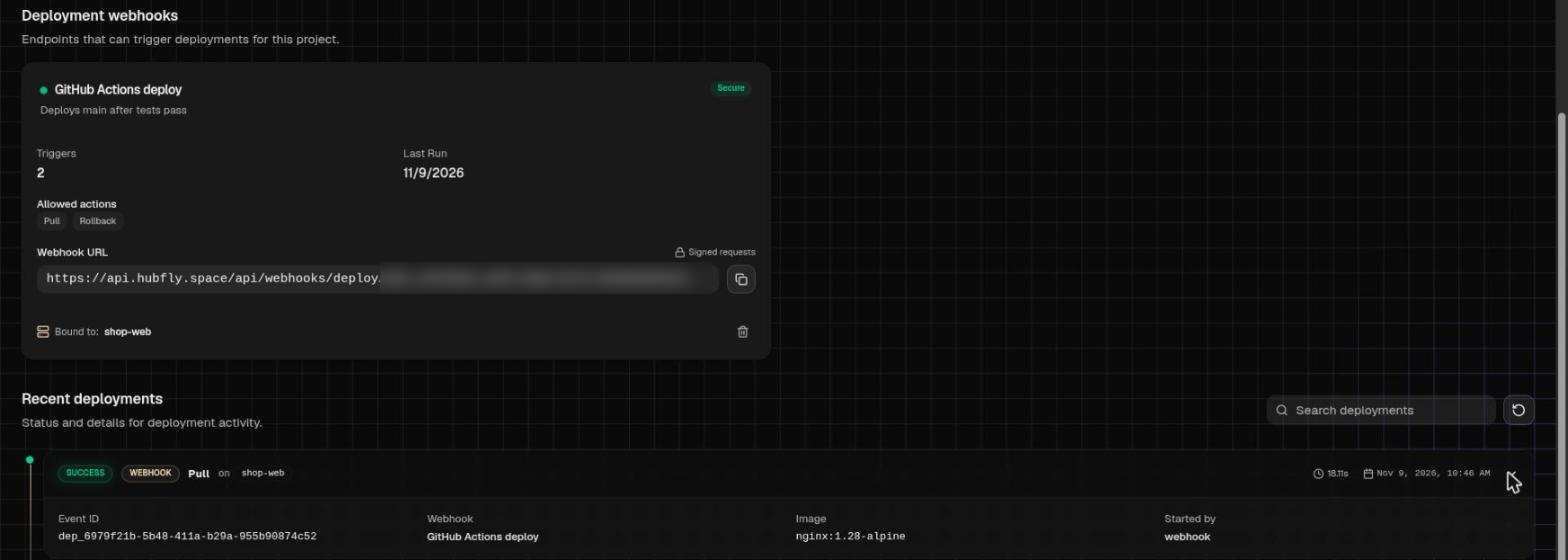
To roll back, open Actions → Deploy to Hubfly space → Run workflow in GitHub, type the previous tag (copy it from the deployment row you want back, such as sha-1a2b3c4) and run it. That pulls the old image through the same signed path.
Hubfly space also has a Rollback Recovery action ({"action":"rollback"}). After an image pull, though, it keeps the image you just pulled instead of switching back to the previous tag, so don't rely on it to undo a bad image. Redeploying the previous tag is the dependable way back.
What can go wrong
| You see | Likely cause | Fix |
|---|---|---|
500 Unexpected server error in about a second |
The call was refused: bad or missing signature, a timestamp more than five minutes off, a body changed after signing, or an action the webhook doesn't allow. No deployment is created | Sign timestamp.body and send the same bytes with --data-binary. Check the runner's clock and the webhook's allowed actions |
500 while another deploy is running |
Two calls overlapped; the deploy may still have run | Keep the concurrency block, then check Recent deployments for what actually ran |
curl: (28) timeout |
The deploy took longer than --max-time |
Raise it; check Recent deployments for the real result |
| Image pushed, nothing changed | A registry push never redeploys by itself | Call the webhook with a pull action |
| "Container is missing" | Project-scoped webhook called without containerId |
Bind the webhook to one container, or add "containerId" to the body |
The docs list 400, 401 and 403 for refused calls; today they return 500, so treat a fast 500 as "refused".
If you delete a webhook's container, the webhook stays active as project-scoped (Bound to: All Containers). Delete it too.
Limits and pricing
- Deploy webhooks are free. There's no charge per webhook or per call.
- You pay for the container. The shared tier (0.3 vCPU, 256 MB) is free for 360 runtime hours a month. A dedicated container with 1 vCPU, 512 MB and 5 GB of disk running all month costs 1 × $0.004 × 730 + 0.5 × $0.002 × 730 + 5 × $0.00001536 × 730 = $2.92 + $0.73 + $0.06 = $3.71 a month, less with Auto Sleep on.
- New accounts: creating resources needs a one-time deposit of $5 or more. It stays as account credit; it isn't a fee.
- One action per request, only the actions you allowed, and signatures expire after five minutes.
Who this is not for
- Teams on GitHub-hosted runners who need an IP allowlist. Those runners have no fixed address.
- Anyone without CI. Point the container at a Git repository and redeploy from the dashboard.
FAQ
Why does my signed webhook request fail?
Almost always the body sent differs from the body signed, or the runner's clock is off by more than five minutes. Use --data-binary "$body" with the same variable you signed.
How do I stop two GitHub Actions deploys from running at the same time?
Add a concurrency group with cancel-in-progress: false. A running deploy finishes first; the newest waiting run goes next, and GitHub cancels older pending runs in the same group.
How do I roll back a deployment from GitHub Actions?
Run the workflow by hand with the previous image tag. Immutable sha- tags make this exact.
Can I put the webhook URL in my repository?
No. Store the URL and the secret as encrypted repository secrets.
Read next
- Docker health checks that catch real problems
- Canary releases with a weighted load balancer
- Gate your app on a database migration job
- How to deploy a Go app with Docker using a tiny image
Go further on Hubfly space
- Catch bad releases sooner with a container health check: observability docs.
- Send 10% of traffic to the new version first with a weighted load balancer: load balancer docs.
- Get notified when an image is pushed or scanned with registry webhooks: webhooks docs.
Stop redeploying by hand. Try it on Hubfly space: 360 free hours a month on the shared tier, after a one-time $5 deposit kept as credit.
By Octave · drafted with AI, tested on Hubfly · Last updated 9 November 2026
Comments
Join the discussionNo comments yet. Be the first to comment.