How to let an AI coding agent deploy your app safely
Versions: Claude Code 2.1.322, Hubfly space CLI v5.0.1
Your coding agent can write the feature and run the tests. Then it hands you a list of deploy commands to paste. Giving it your cloud CLI fixes that, but the same agent can now delete a database or print its password into the chat. This guide shows how to let an AI coding agent deploy your app safely: it reads freely, asks before anything that ships or costs money, and is blocked from the common commands that destroy data or reveal secrets. A spending cap in the dashboard backs it up.
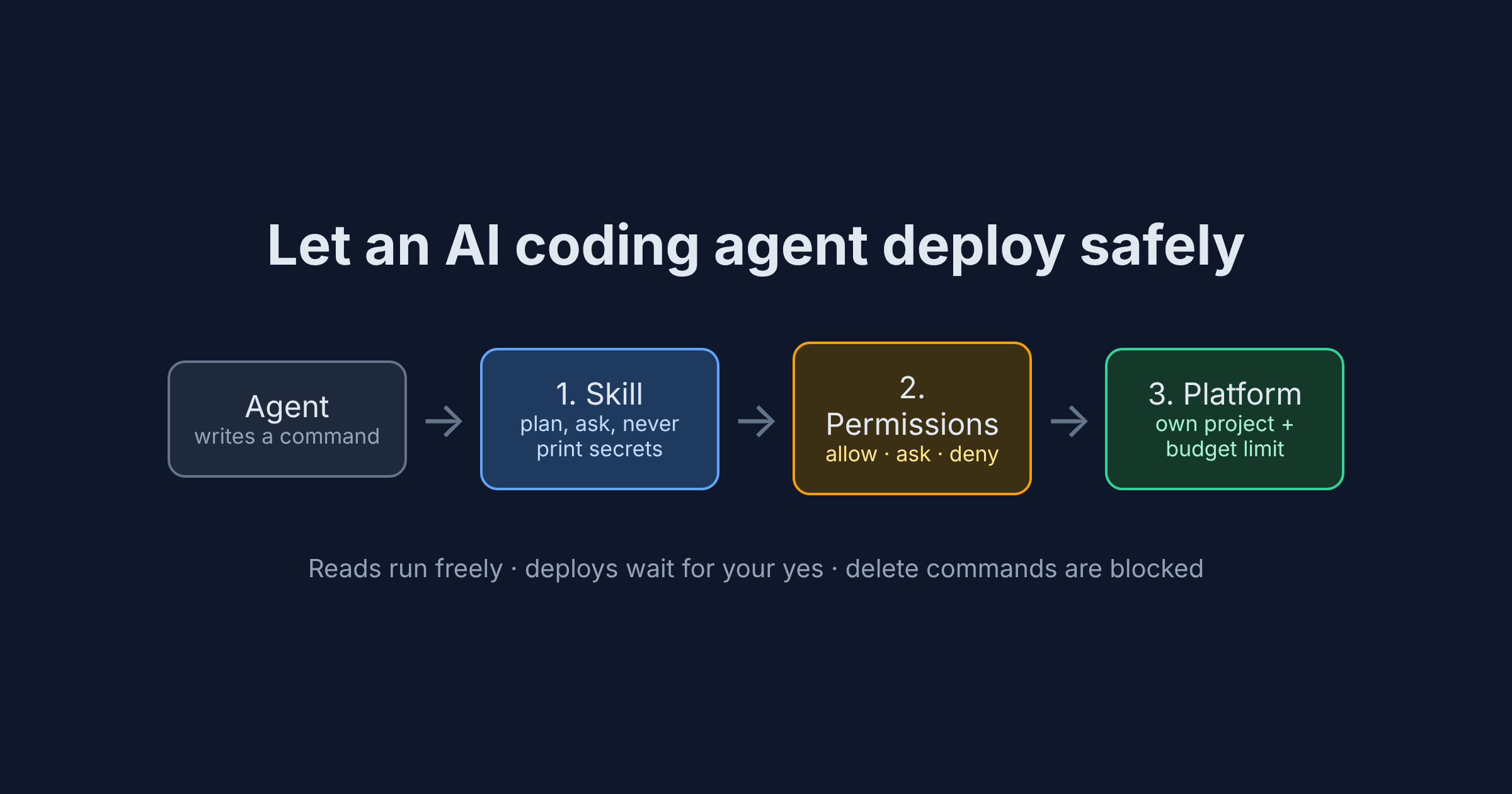
How to let an AI coding agent deploy safely: three fences
- The agent's habits: the Hubfly space agent skill tells it how to plan, when to ask and what never to print.
- Your agent's permission rules: Claude Code checks every shell command against allow, ask and deny lists before it runs.
- The platform: a monthly budget cap and a separate project for agent work, set in the dashboard.
Step 1: Install the CLI and log in yourself
Install the Hubfly space CLI (v5.0.1 at the time of writing) from the CLI docs, then run hubfly login in your own terminal, never through the agent's chat. Why: the agent can use your session without the token ever appearing in the conversation.
Step 2: Add the agent skill to your repo
Hubfly space publishes a skill file for coding agents. Save it where Claude Code looks for project skills:
mkdir -p .claude/skills/hubfly-cli
curl -fsSL https://www.hubfly.space/skills/hubfly-cli/SKILL.md \
  -o .claude/skills/hubfly-cli/SKILL.md
For other agents, .agents/skills/hubfly-cli/SKILL.md is the portable location that Codex and Cursor also scan.
Read it before you commit it. Why: these are the instructions your agent will follow. Four rules do most of the safety work:
--yes"is not user authorization". It only skips the CLI's own prompt after you have approved the exact operation.hubfly stack down --volumescounts as data deletion and needs a separate confirmation that names the volumes.- Secrets stay out of the chat:
db url,db envanddb credentialshide values unless--revealis added, and the agent is told to avoidprintenv. hubfly deploy planis not guaranteed to be read-only. It skips the image build, upload and rollout, but it can writehubfly.build.json, download a builder, or bind or create a project.
Two more things the skill does:
- It re-fetches itself. The agent loads the live skill at the start of every task and follows it where your copy differs. That keeps it current, but a change reaches your agent before you read it.
- It edits your instruction file. On first use, the agent adds a short block between
<!-- hubfly:skill:start -->and<!-- hubfly:skill:end -->toCLAUDE.md,AGENTS.mdor similar, so later sessions remember where the project deploys. Review that diff like any other.
Step 3: Write the permission rules
Save this as .claude/settings.json in the repo:
{
  "permissions": {
    "allow": [
      "Bash(hubfly whoami)",
      "Bash(hubfly version)",
      "Bash(hubfly stack status *)",
      "Bash(hubfly stack logs *)",
      "Bash(hubfly logs *)",
      "Bash(hubfly build validate *)",
      "Bash(hubfly build explain *)"
    ],
    "ask": [
      "Bash(hubfly deploy *)",
      "Bash(hubfly stack plan *)",
      "Bash(hubfly stack up *)",
      "Bash(hubfly stack exec *)",
      "Bash(hubfly stack ssh *)",
      "Bash(hubfly compose *)",
      "Bash(hubfly container *)",
      "Bash(hubfly exec *)",
      "Bash(hubfly ssh *)",
      "Bash(hubfly tunnel *)",
      "Bash(hubfly env *)",
      "Bash(hubfly db *)",
      "Bash(hubfly database *)",
      "Bash(hubfly databases *)",
      "Bash(hubfly storage *)",
      "Bash(hubfly realtime *)",
      "Bash(hubfly rt *)",
      "Bash(hubfly update *)",
      "Bash(hubfly config *)"
    ],
    "deny": [
      "Bash(hubfly stack down *)",
      "Bash(hubfly compose down *)",
      "Bash(hubfly * delete *)",
      "Bash(hubfly storage rm *)",
      "Bash(hubfly * rotate *)",
      "Bash(hubfly * revoke *)",
      "Bash(hubfly * credentials *)",
      "Bash(hubfly * --reveal*)",
      "Bash(hubfly login *)",
      "Bash(hubfly logout *)",
      "Bash(hubfly auth *)",
      "Bash(printenv *)",
      "Bash(env)"
    ]
  }
}
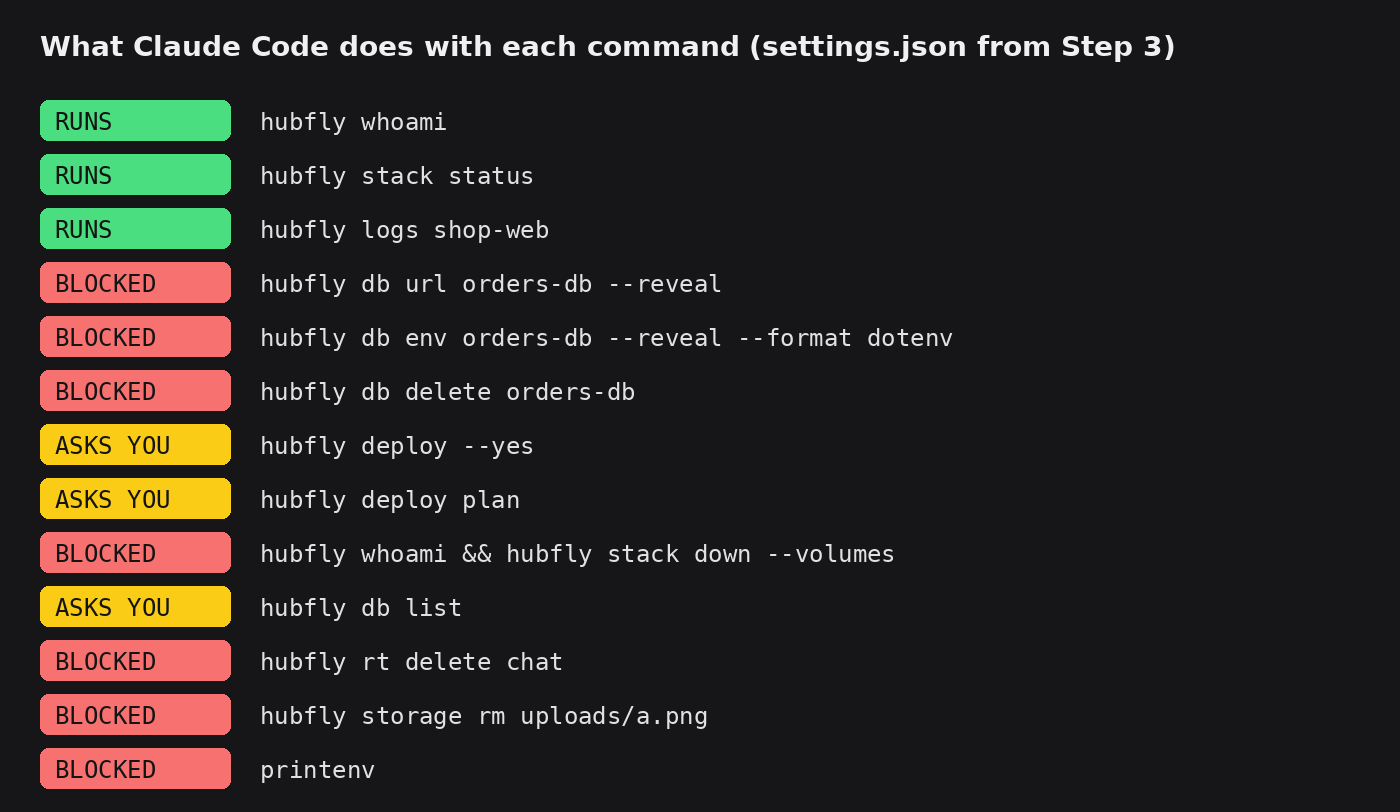
Here is what Claude Code 2.1.322 does with this file:
Why the file looks the way it does:
- Deny beats ask, and ask beats allow. So
hubfly db url orders-db --revealis blocked even thoughdbis in ask, andhubfly deploy --yesstill asks. The flip side: an allow rule can't carve a hole in an ask rule, sohubfly deploy statusasks too. - A
*in the middle works.hubfly * delete *blocksdb delete,database delete,rt deleteandstorage buckets deletewith one line. - Watch out for aliases. The CLI accepts
databaseanddatabasesfordb, andrtforrealtime. A deny rule written ashubfly db delete *would misshubfly database delete orders-db. - Use
--reveal*, not--reveal *. The version with a space doesn't match when--revealis the last word. - Chained commands are checked part by part. In
hubfly whoami && hubfly stack down --volumesthe second part hits deny, so nothing runs. build validateandbuild explainstay in allow because they don't deploy anything, though they can create or normalisehubfly.build.json.git diffshows what changed.- You log in and out, not the agent. Denying
login,logoutandauthstops it from switching accounts.
If you need a secret in a local file, run the --reveal command yourself in your own terminal and keep that file in .gitignore.
Step 4: Add the platform fence
Permission rules match command text, and Claude Code's docs say Bash rules aren't a security boundary. For example, sh -c 'hubfly stack down' doesn't match the deny rule: it gets a normal permission prompt, so it only stops if you read it and say no. So add limits that live outside the agent's files:
- A separate project for agent work. Name it after the app, such as
shop-web, and tell the agent to deploy only with--project shop-web. If something goes wrong, only that project is affected. - A monthly budget cap. When you create the project, open Advanced Options and set Monthly Budget Limit: $10, $50, $100, Unlimited, or any amount above $1.00. You can change it later in the project's Settings → General & Budget.
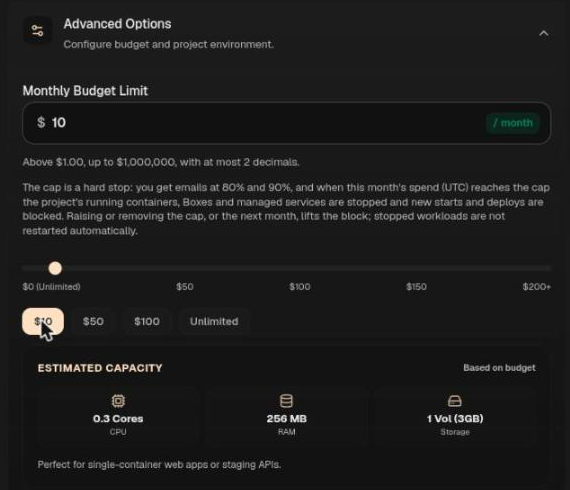
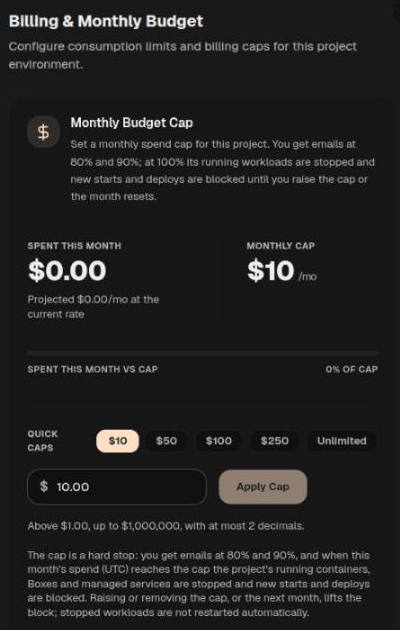
The cap is a hard stop. You get emails at 80% and 90%. When the month's spend (UTC) reaches the cap, the project's running containers, Hubfly space Boxes and managed services stop, and new starts and deploys are blocked. Raising the cap, or the next month, lifts the block, but stopped workloads don't restart on their own.
- Know what the token can do. API tokens support exact-match scopes and can be pinned to up to 50 projects (API authentication), but the CLI docs say a CLI login token carries full project deployment and execution scope. Treat the agent's session as having that full access. That's why the deny list and the cap matter.
Step 5: Ask for a deploy
Start Claude Code in the repo, run /permissions to see the rules it loaded, then try:
Deploy my web app to the shop-web project with HTTPS and keep Postgres private.
Status checks run without asking. Every plan, up, deploy, env or db command stops for a yes, so approve the plan first and read what will change. The skill tells the agent to report success only when the deployment session reaches its final state, along with the build ID.
What it costs
The skill and CLI are free. One always-on Dedicated Hubfly space Cell (1 vCPU, 512 MB RAM, 5 GB disk) for a 730-hour month:
| Item | Math | Monthly |
|---|---|---|
| CPU | 1 × $0.004 × 730 | $2.92 |
| RAM | 0.5 GB × $0.002 × 730 | $0.73 |
| Storage | 5 GB × $0.00001536 × 730 | $0.06 |
| Total | ≈ $3.71 |
That fits well under a $10 cap. Shared-tier containers sleep when idle and come with 360 free compute hours a month, which suits preview deploys. Creating new resources needs a one-time deposit of $5 or more, kept in your account as credit.
What can go wrong
hubfly deployruns with no prompt. Open/permissions, check the ask rule is listed, and make sure you haven't switched to a mode that skips prompts.--yesnever skips Claude Code's prompt.- A command you expected to run keeps asking. An ask rule wins over a more specific allow rule. Approve it, or accept the extra prompt.
- Secrets land in the chat.
--revealandprintenvare blocked, but anexecorsshcommand that runsenvinside a container is another route. That's whyexecandsshare in ask: read the command before you approve. - A wrapped command gets a prompt instead of a block. Say no to any prompt that hides a
hubflycommand insidesh -cor a script. - Workloads stopped and didn't come back. The project hit its cap. Raise it, then start the containers again yourself.
Who this is NOT for
- Unattended CI. This setup needs a person to answer prompts. Use a pipeline with
HUBFLY_TOKENstored as a secret. - Teams that need a hard wall. Use Claude Code's sandbox or a separate machine. Permission rules are a seatbelt, not a vault.
FAQ
Can an AI coding agent deploy to production safely? Much more safely if it must ask before every deploy, is blocked from delete and secret commands, and works in a project with a budget cap. Keep production in its own project.
Are deny rules enough to stop an agent deleting data? No. A wrapped command gets a prompt instead of a block. Add the cap and a separate project, and read every prompt.
Does --yes bypass Claude Code's permission prompt? No. It only skips the CLI's own confirmation.
What happens when the budget cap is reached? Emails at 80% and 90%. At 100% the project's workloads stop and deploys are blocked until you raise the cap or the month resets.
Is hubfly deploy plan read-only? Not guaranteed. It can write a config file or create a project, so keep it behind a prompt.
Does this work with Codex or Cursor? The skill does, from .agents/skills/. Their approval settings use their own format, so copy the same allow, ask and deny split.
Go further on Hubfly space
- Give each agent task its own locked-down container: AI agent sandbox, one container per task.
- Deploy from CI instead of a chat with deploy on push using a GitHub Actions webhook.
- Gate your deploy on a database migration with a migration job in Docker Compose.
360 free compute hours a month on the shared tier; a one-time $5 deposit, kept as credit, unlocks new resources. Create a project with a $10 budget cap and let your agent ship its next preview. Try it on Hubfly space →
By Octave · drafted with AI, reviewed by Octave · Last updated 10 November 2026
Comments
Join the discussionNo comments yet. Be the first to comment.